
Kraftius The software 3BUUT runs on
From quote to delivery, your print shop on one screen.
Kraftius is management software for 3D printing workshops. It prices from machine hours and grams, takes material out of stock on its own, and books the income. Every 3BUUT job is opened in it today.
- Every feature free
- No card required
- Your language and currency
An example printer and material are ready for your first quote.
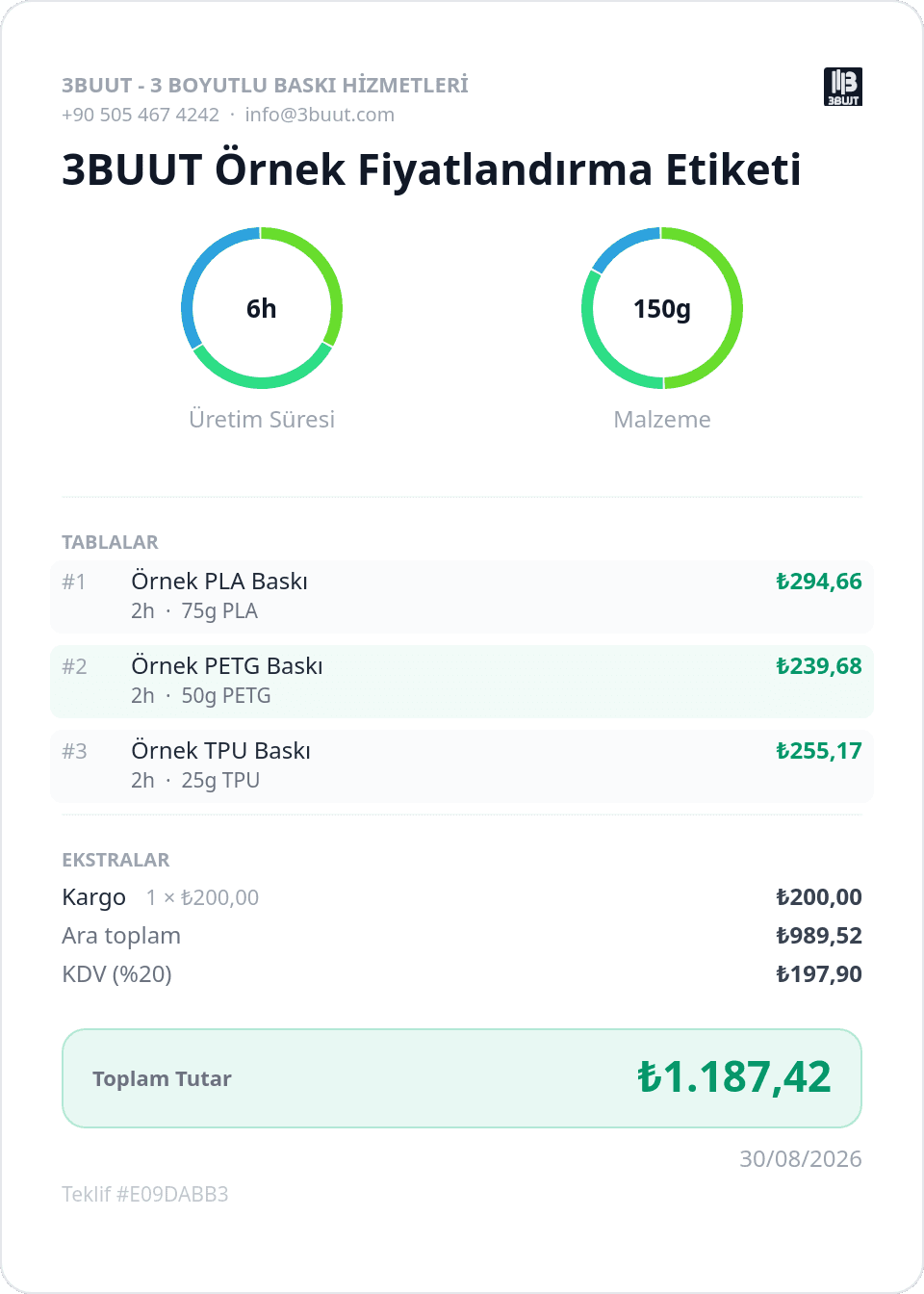
- 6 h
- Machine time, multiplied by the printer's hourly rate
- 150 g
- Material, at its price per gram plus waste
- 3 beds
- Each bed is priced on its own
- ₺1,187.42
- Shipping and VAT included, one number
- 01Born in a working shopWritten as the in-house system of 3BUUT in Konya, Türkiye, and used there every day.
- 02Your language, your moneyEnglish, Turkish, German and Czech interface; 18 currencies.
- 03In the office and at the machineThe same job queue on desktop and phone. Operators log progress from their phones.
Three leaks in a spreadsheet-run print shop.
A spreadsheet, a notebook or a good memory will get jobs out the door. As orders grow, money quietly escapes in three places.
- 01
Underpriced jobs
The cost of the grams gets counted; the machine's hours, electricity and wear often don't. Long prints lose money.
Kraftius keeps an hourly rate per printer and builds every price from hours × machine rate + grams × material price.
- 02
Stock surprises
You learn a spool is empty when it runs out, usually on the day the rush order arrives.
When a job is ready, its material comes out of stock on its own, and running-low materials show up on the dashboard.
- 03
Quotes that drift
Filament goes up after the customer approves, the sheet recalculates, and the record no longer matches what you promised.
When a job leaves draft its bed prices are frozen; a later price change on a spool or a printer can't move the approved quote.
Six stages. Each one does something for you.
Click a stage or step forward, and watch what each one adds to the job record.
Open the job
Enter the customer, the beds, and each bed's printer, material, time and grams. The price is worked out as you type.
Not a drawing. The app itself.
These are screenshots of Kraftius running.
Know your negotiating room.
Move the margin and the customer price, your profit and your break-even move with it. You see how far you can discount without a calculator.

Every bed, every part.
How many parts are accepted, how many are left, how much time is spent and how much remains. Bed by bed, with plus and minus buttons.

Know what's left on the spool.
Filaments and resins grouped by type, with what's left, the price per kilo and a low-stock warning at a glance.

What needs you today?
Upcoming deadlines, work on the shop floor, stock warnings and commercial items in one list.

The month's income and costs.
Completed jobs land in the ledger on their own; a material purchase can be logged as a cost while you restock it.

Captured from Kraftius's example workshop.
A 3D printing price rests on two real numbers: hours and grams.
Kraftius builds every quote the same way. The labels 3BUUT sends its customers come out of it too.
Read 3BUUT's pricing label line by line (Turkish)- Machine time
- print hours × the printer's hourly rate (electricity included in that rate)
- Material
- grams × the material's price per gram × waste allowance
- Extras
- labor, hardware and consumables
Then your decisions:
- Margin
- Discount
- Round-up
- Custom price
- Tax
From one printer to a print farm.
- A shop just startingStart with one printer, one material and one real job. Price your first quote properly.
- A growing print farmSee every printer's load on the calendar and hand work to operators by permission.
- Labs and school makerspacesKeep a record of who printed what and how much material it took.
What it doesn't do yet.
Worth knowing before you choose:
- It doesn't read sliced files (G-code, 3MF); each bed's time and grams are typed in.
- It doesn't take payments or send email; you share the quote yourself.
- During the beta, protective limits apply to storage and usage.
Before you start.
Is Kraftius paid?
It's free during the open beta. Every feature is on and no card is required. Prices will be announced before any paid plan starts.
Do I need to be a 3BUUT customer?
No. Kraftius is a separate product any 3D printing workshop can use. Each workshop's data is kept separate from every other workshop's.
Which languages and currencies?
The interface is available in English, Turkish, German and Czech, with 18 currencies to choose from.
Can it read my slicer files?
No. Print time and material weight are entered per bed. Reading them from the file is planned but not available yet.
Can operators work without seeing prices?
Yes. You set each operator's permissions. Operators can track jobs and log progress while your margins stay private.
Can I export my data?
Yes. You can export your workshop records, including projects, customers, resources and the ledger, as a JSON file.
Does it work on a phone?
Yes. Kraftius runs in the browser, on desktop and phone with the same account. Nothing to install.
Kraftius
Start with one real job.
Build your first quote with the example printer and material, then add your own machines. Free during the beta.